



What is a CAT Tool: Complete Guide to Computer-Assisted Translation Software
 Tweet
Tweet Share
Share E-mail
Introduction: What is a CAT Tool and Why It Matters
What is cat tool? Computer-Assisted Translation tool is specialized software that helps human translators work more efficiently by automating repetitive tasks, storing translation memories for reuse, and maintaining translation consistency across projects. Unlike machine translation systems such as Google Translate, CAT tools require human input and expertise while providing systematic support for professional translation workflows.
In this comprehensive guide, you'll learn what computer assisted translation tools are, how they revolutionize the translation process, and how to choose the right solution for your needs. We'll cover core definitions, key features, implementation strategies, and real-world applications that demonstrate why over 95% of professional translators rely on these essential software programs.

This guide addresses the needs of freelance translators, language service providers, project managers, and businesses seeking to understand how CAT software can improve translation quality while reducing translation costs.
Understanding CAT Tools: Core Definitions and Key Concepts
What CAT Tools Are and Aren't
Computer assisted translation software serves as a digital workspace where human translators can efficiently manage translation projects. The acronym CAT stands for Computer-Assisted Translation (also known as Computer-Aided Translation), emphasizing that these tools assist rather than replace professional translators.
Key distinctions include:
- CAT tools require human expertise for context, cultural nuances, and quality decisions
- Machine translation attempts full automation but lacks the contextual understanding for high quality translations
- Translation management systems focus on workflow coordination, while CAT tools handle the actual translation process
- Most CAT tools now integrate machine translation capabilities as suggestions, not replacements
How CAT Tools Relate to Translation Technology
Modern CAT tools function within a broader translation technology ecosystem:
- Translation Management Systems (TMS) coordinate projects while CAT tools handle translation execution
- Content Management Systems often integrate with CAT software for seamless localization workflows
- Terminology management software works alongside CAT tools to maintain consistent terminology
- Marketing automation platforms frequently connect with CAT tools for multilingual campaign management
This integration enables automated workflows that streamline translation related tasks while maintaining the quality that only human translators can provide.
Why CAT Tools Are Essential in Modern Translation
The translation industry has fundamentally shifted toward computer assisted translation cat workflows due to measurable benefits:
Industry Adoption and Performance:
- 95% of professional translators have used CAT tools like Crowdin since the mid-1990s
- Translation projects show 40-60% faster completion rates when leveraging translation memory
- Translation consistency improves by up to 85% through terminology management features
Core Business Benefits:
- Productivity gains through reuse of previously translated content and automated repetitive tasks
- Cost reduction by eliminating duplicate translation work across similar projects
- Quality assurance through automated checks and consistent terminology databases
- Scalability enabling multiple translators to work on the same project simultaneously
The ability to reuse previously translated content becomes particularly valuable in localization projects where similar phrases, technical terms, and formatting appear across multiple documents or target languages.
Key Features Comparison: Desktop vs Cloud-Based CAT Tools
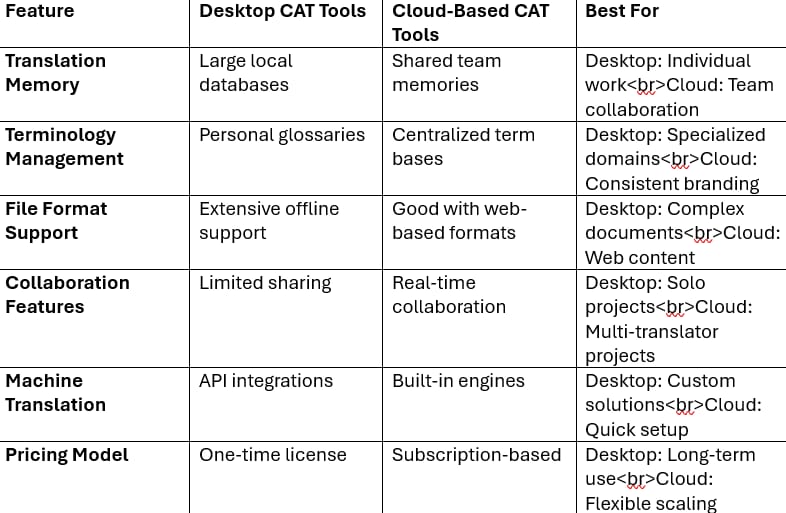
Popular CAT Tools by Category:
- Desktop Solutions: SDL Trados Studio, MemoQ Translator Pro (traditional powerhouses with advanced features)
- Cloud-Based Platforms: Phrase, Smartcat, MateCat (modern user interfaces with collaboration focus)
- Hybrid Options: Wordfast Pro (combining offline capabilities with cloud synchronization)
The choice between desktop and cloud-based cat tool options depends on team size, collaboration requirements, and integration needs with existing translation workflows.
Step-by-Step Guide to Using CAT Tools Effectively
Step 1: Project Setup and File Analysis
File Import and Analysis:
- Import source documents into your CAT tool (supporting formats from Word to XML)
- Run automated analysis to identify repetitions, fuzzy matches, and new content
- Review match statistics to estimate project scope and translation costs
Translation Memory Configuration:
- Set up project-specific translation memories or leverage existing databases
- Import relevant past translations from similar projects or clients
- Configure terminology databases with industry specific jargon and approved terms
Quality Settings:
- Establish quality assurance rules for tag verification and formatting consistency
- Configure automated checks for terminology compliance and completeness
- Set up reference materials and translation glossaries for easy access
Step 2: Translation Workflow Execution
Segment-by-Segment Translation: The CAT tool divides source content into translation units (typically sentences), presenting each in the user interface alongside space for the target language translation.
Leveraging Automation Features:
- Accept high-percentage translation matches from translation memory
- Use terminology suggestions for consistent term usage across the translated document
- Apply machine translation suggestions as starting points for post editing
Maintaining Visual Context:
- Preserve original formatting through automated tag management
- Preview translated content in context to ensure appropriate layout
- Handle bilingual files while maintaining document structure integrity
Step 3: Quality Control and Project Delivery
Automated Quality Assurance:
- Run comprehensive QA checks for missing translations and tag errors
- Verify terminology consistency against project-specific databases
- Check formatting compliance and completeness across all translation units
Project Finalization:
- Export translated files in original formats with preserved formatting
- Update translation memory with new segments for future project reuse
- Generate project reports showing productivity metrics and quality statistics
Database Maintenance:
- Clean and organize translation memories for optimal future performance
- Update terminology databases with new approved terms
- Archive project data for referencing internal knowledge in future work
Common Mistakes to Avoid When Using CAT Tools
Mistake 1: Over-relying on Fuzzy Matches Without Context Review
Many translators automatically accept fuzzy matches without considering context changes, leading to inappropriate translations. Even 90% matches may require significant revision depending on the surrounding content.
Mistake 2: Neglecting Translation Memory Database Maintenance
Poor-quality translation memories containing errors or outdated terminology can propagate mistakes across multiple projects. Regular cleaning and validation ensure high quality translations.
Mistake 3: Ignoring Terminology Management Setup
Starting projects without proper terminology databases leads to inconsistent translations and increased post-editing time. Investment in terminology management pays dividends in consistency and efficiency.
Pro Tip: Balance automation features with human expertise by treating CAT tool suggestions as starting points rather than final translations. The learning curve for mastering these tools typically spans 2-3 months, but the productivity gains justify the initial investment in training and setup.
Real-Life Example: Technical Manual Translation Project
Case Study: Software Company User Manual Translation
A technology company needed to translate a 500-page software user manual from English to German for a product launch.
Starting Situation:
- 50,000 words of technical content
- 30% repetitive content (error messages, interface elements)
- Established terminology requiring consistent translation
- Tight deadline requiring efficient translation workflow
CAT Tool Implementation:
- Tool Used: SDL Trados Studio with custom translation memory
- Setup: Imported existing terminology databases and previous software translations
- Workflow: Two professional translators working on different sections simultaneously
- Quality Control: Automated terminology checking and formatting verification
Results Achieved:
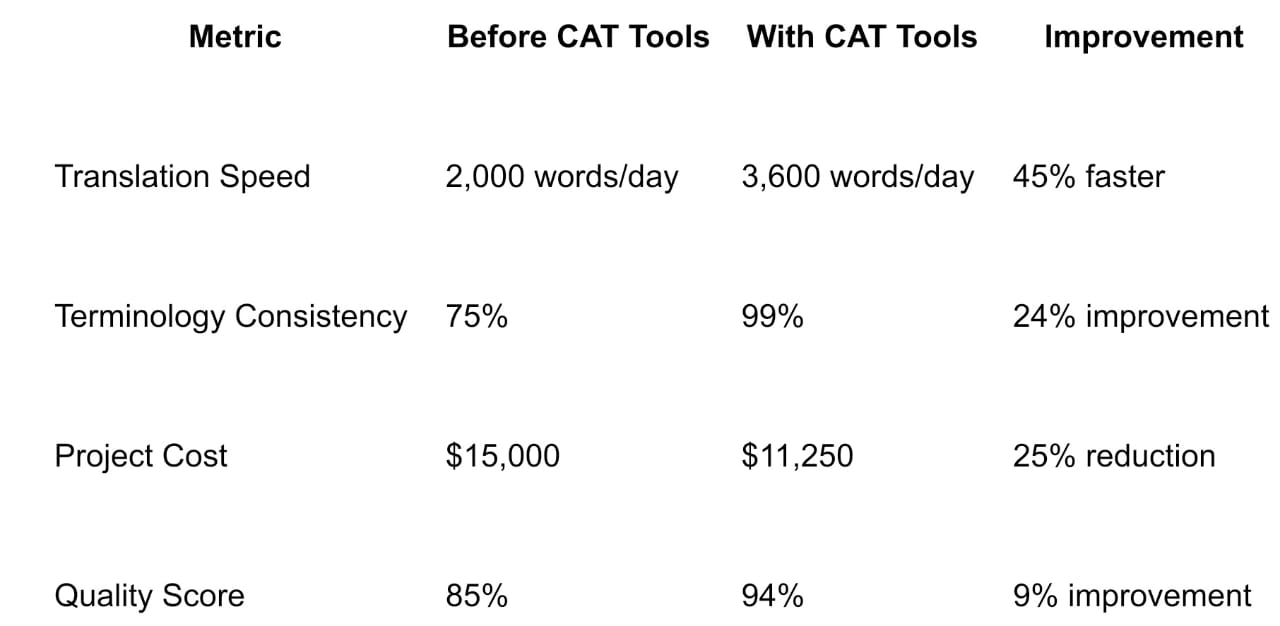
The project completed 10 days ahead of schedule, with translation consistency enabling seamless integration across all software components.
FAQs About CAT Tools
Is Google Translate a CAT tool?
No, Google Translate is a machine translation system that works without human input, while CAT tools assist human translators by providing translation memories, terminology management, and quality assurance features.
Do I need technical skills to use CAT tools?
Basic computer skills are sufficient for most CAT software. Modern cat tools offer intuitive user interfaces, and most vendors provide comprehensive training resources and customer support to help users master the learning curve.
Can CAT tools handle all file formats?
Most cat tools support common formats including Word, PDF, HTML, and XML files. However, compatibility varies by tool, so verify format support for your specific translation projects before selecting software.
Are CAT tools worth the investment for freelance translators?
Yes, productivity gains from translation memory and terminology management typically offset software costs within 2-3 months of regular use. The ability to manage translations more efficiently and maintain quality makes CAT tools essential for competitive freelance work.
How do CAT tools improve translation quality?
CAT tools enhance quality through consistent terminology, automated quality assurance checks, and the ability to reuse high-quality previous translations. The combination of human expertise with systematic support produces more reliable results than manual translation alone.
Conclusion: Key Takeaways About CAT Tools
Computer assisted translation tools represent essential software for modern professional translators, not replacement technology. These powerful programs enhance human expertise rather than eliminating the need for skilled linguists.
Core Benefits Include:
- Faster translation completion through translation memory leverage and automation features
- Improved consistency via terminology management and quality assurance systems
- Cost reduction through reuse of previously translated content across similar projects
- Enhanced collaboration capabilities for complex localization projects
Success Factors:
- Proper setup of translation memories and terminology databases is crucial for optimal performance
- Balance between automation features and human judgment ensures high quality translations
- Regular maintenance of translation-related databases prevents quality degradation over time
Next Steps: Choose CAT software based on your specific needs: file format requirements, collaboration features, budget constraints, and integration with existing translation workflows. Download free trials of popular cat tools like Phrase, Smartcat, or SDL Trados Studio to experience their capabilities firsthand, or consult with translation technology specialists to identify the best cat tool for your specific requirements.
The investment in learning and implementing CAT tools pays dividends through improved productivity, consistent quality, and competitive advantages in the rapidly evolving translation industry.
COMTEX_468968847/2891/2025-09-22T13:05:39
Serious News for Serious Traders! Try StreetInsider.com Premium Free!
You May Also Be Interested In
- Beyond 600 AI Employees: Tec-Do 2.0 Builds an Agent Skill Lab for Enterprise Productivity
- LG Display OLED becomes world's first to achieve "Perfect Color/Brightness" certification
- Beyond the IGV Swing Lies the Rise of AI Application Leaders Like Tec-Do
Create E-mail Alert Related Categories
Globe PR Wire, Press ReleasesRelated Entities
DividendSign up for StreetInsider Free!
Receive full access to all new and archived articles, unlimited portfolio tracking, e-mail alerts, custom newswires and RSS feeds - and more!
